
Logo

Cash Practice® Systems Help Center

Search our knowledge base to get answers to your questions, access video training & more!

How do I turn the Auto-Card Updater off for a patient's card?

Auto-Debit System® (Frictionless Payments)

How do I turn the Auto-Card Updater off for a patient's card?

Last updated on 17 Nov, 2026

Step 1: From the Dashboard, click on the [Billing Vault] shortcut.

image.png

Step 2: Type the patient's first or last name in the [Patient Account] field.

Then, select the correct patient from the drop-down, and click [Search].
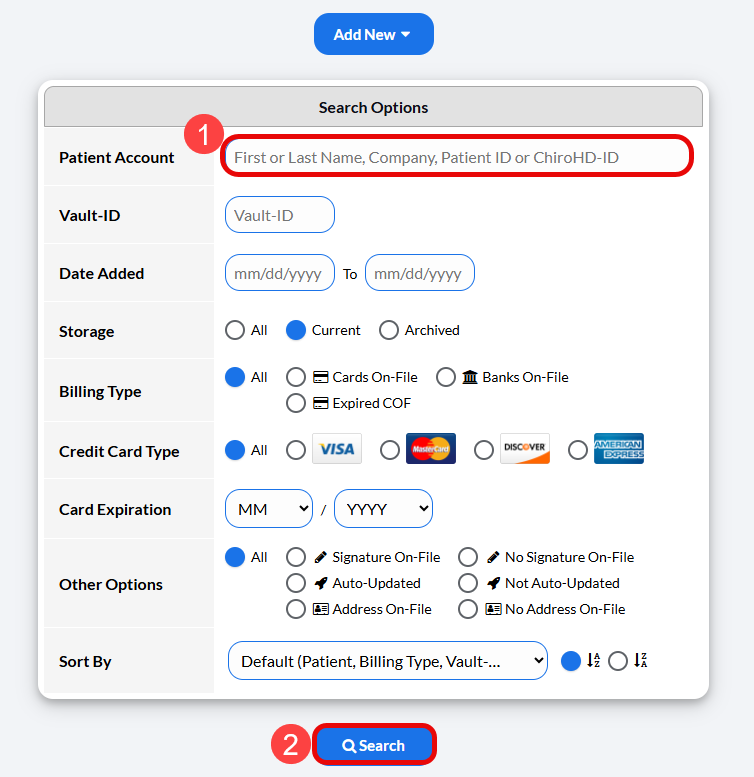
image.png

Step 3: Locate the specific card that you need to turn off the Auto-Card Updater feature and click on the toggle. It will display as shown below when the feature is turned off.

The system will automatically save your changes. 

image.png

Did you find this article helpful?
Previous

Reports: How to export a list of auto-debits into an Excel spreadsheet

Next

© 2026 Cash Practice Systems. All rights reserved.