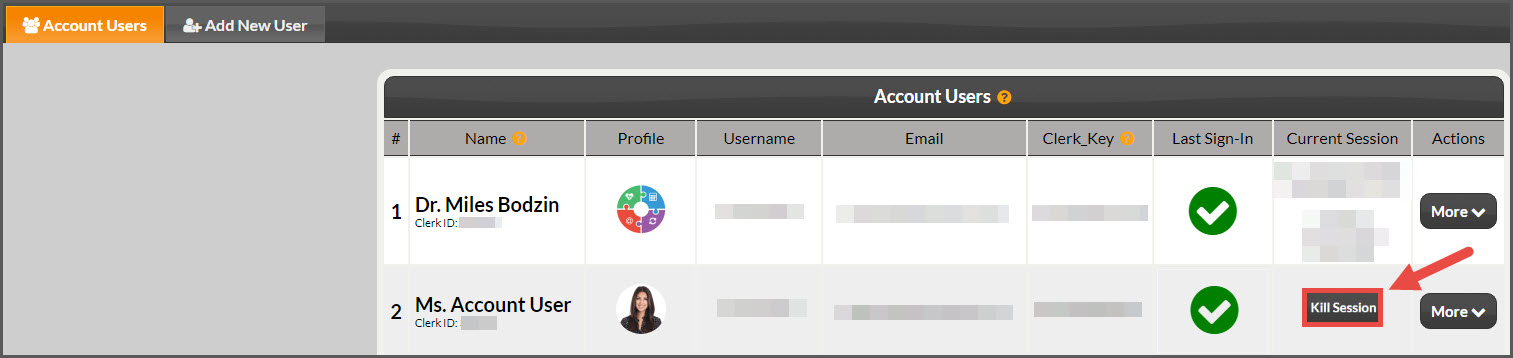
Admin/Owners and account users with permission have the ability to stop or kill another account users logged-in session.
Why?
The account user should not be logged in because they're no longer an employee and you forgot to disable their account.
The account user is logged in when they shouldn't be working.
You like messing with them. ;)
How?
To kill an account user's session, you must be either the Admin/Owner listed on the account OR be an account user who has permission to kill sessions.
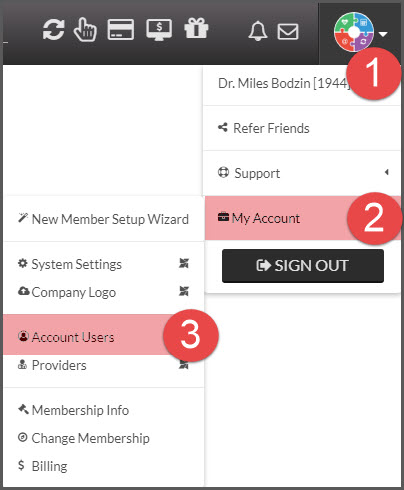
Step 1: Hover over the [User Profile] menu→ hover over [My Account] → click on [Account Users].
Step 2: From the listed account users that appear as logged in, click the [Kill Session] button and they will be logged out instantly.