Logo

Cash Practice® Systems Help Center

Search our knowledge base to get answers to your questions, access video training & more!

Getting Started: How do I tell my patients we will begin doing Auto-Debits? Auto-Debit Announcement

Auto-Debit System® (Frictionless Payments)

Getting Started: How do I tell my patients we will begin doing Auto-Debits? Auto-Debit Announcement

Last updated on 06 Oct, 2026


To help make informing your patients about starting to auto-debit their accounts easier, we have loaded an announcement letter in the Bonus Materials section for you to post in your office, as well as send to your patients. 


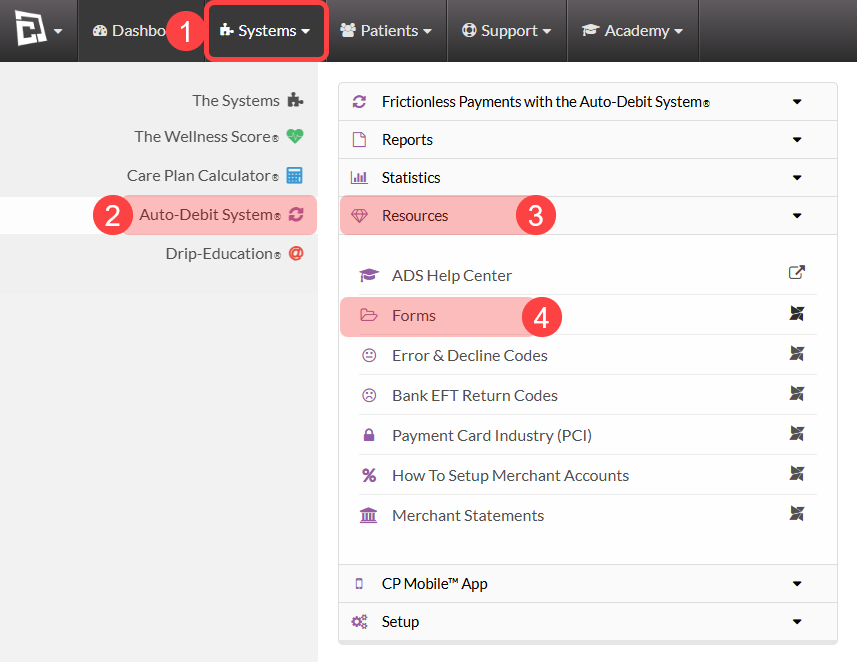
Step 1: Follow the sequence to access your Auto-Debit System forms:

  1. First, hover over [Systems]

  2. Then, click on [Auto-Debit System®]

  3. Select [Resources]

  4. Then click [Forms].

image.png

Step 2: Click on the [Auto-Debit Announcement Letter] to download and customize it for your practice. 

image.png

Did you find this article helpful?
Previous

Getting Started: Why Compliant - Automated Payments Are So Important

Next

© 2026 Cash Practice Systems. All rights reserved.