

Your patient may also check their Gift Card balance by visiting www.mygiftcardvalue.com
Click the Self Help button to use the Cash Practice® walkthrough when logged into your account.

Getting started:
Step 1: From the top right of the menu, click on the [Gift Card] icon.

Step 2: Select the [Check Value & Status] button.
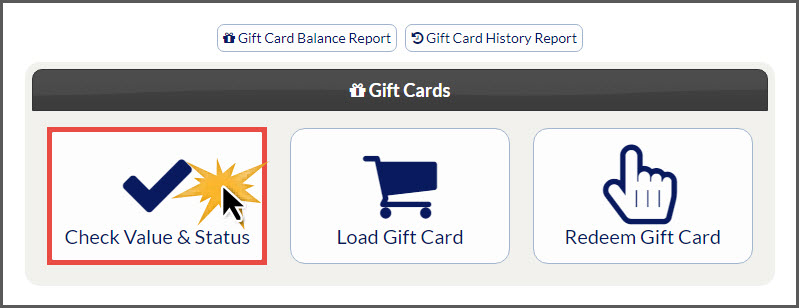
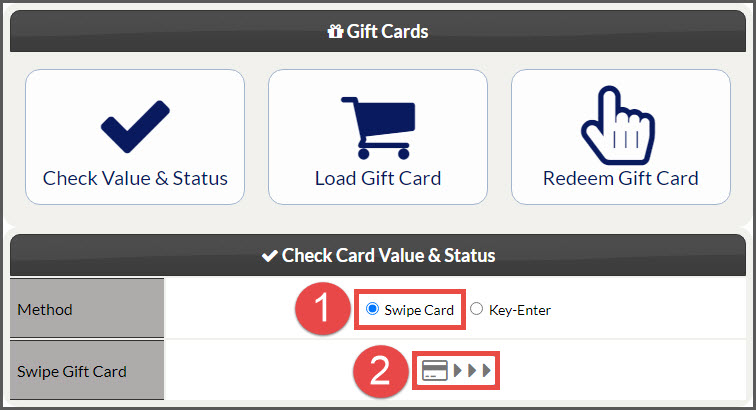
Step 3: You may select to either Swipe the card or Key-Enter the card number from the back of the card. Instructions for both below:
Swiped: Select the button next to [Swipe Card], then proceed with swiping the Gift Card. *Requires the Cash Practice® USB Card Swiper.
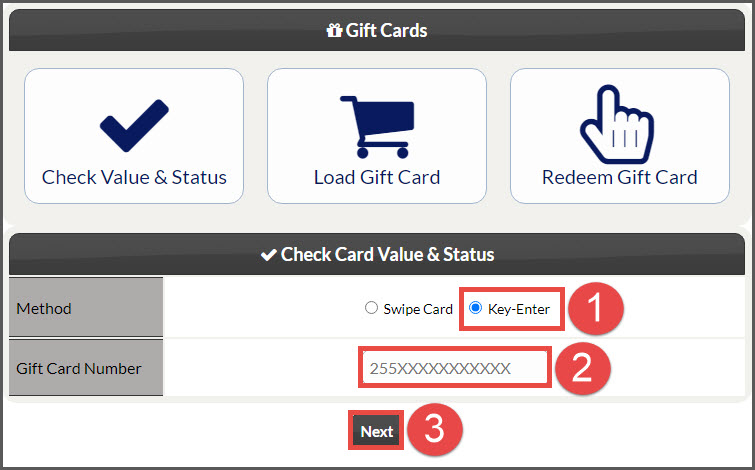
Key-Enter: Select the button next to [Key-Entered]. Enter the card number located on the back of the Gift Card. Click [Next].
Step 4: The page will load to display the [Gift Card Status].
Card Number: This will show the encrypted card number except for the last four digits for identification.
Card Value: View the total gift card value/balance
Nickname (optional): The [Nickname] field allows you to identify the card by name. This comes in handy if the patient has multiple gift cards. If you add a [Nickname], click the [Save] icon to the right
If you would like to return to the [Gift Card] menu, select the [Back] button.
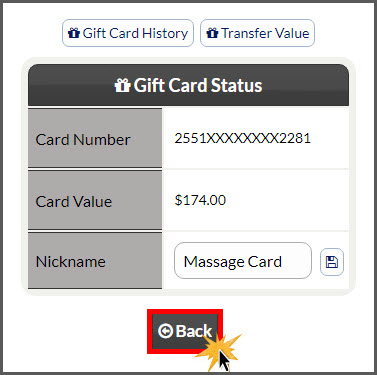
Also included on this page is the [Gift Card's History] & [Transfer Value] buttons.
If you are unable to access or use the Gift Cards feature, please contact your account administrator to request permission. Instructions on how to locate and edit permissions HERE. Make sure to click over to the Auto-Debit System® section to locate the Gift Cards permissions.