
Logo

Cash Practice® Systems Help Center

Search our knowledge base to get answers to your questions, access video training & more!

How can I review the billing charges on my account?

Membership Billing

How can I review the billing charges on my account?

Last updated on 14 Sept, 2025

You must be logged in as the Administrator to access Billing History/Account Balance

Step 1: Log in to your account as the Admin/Owner or user with permission.

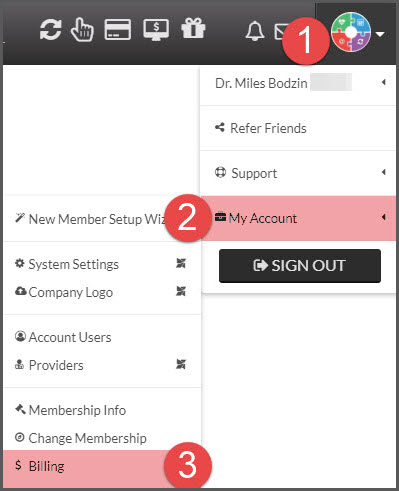
Step 2: Hover your mouse over the User Profile→ hover over [My Account] → select [Billing].
Image

Step 3: To view the Billing History, locate the [Billing History] option on the top left side of your screen.

Image

 Step 4: You may also print out your billing history by clicking on the [Print Report] button at the top of the page. 

Image

Did you find this article helpful?
Previous

What if I don't agree with the amount charged to my Credit Card/Bank Account?

Next

© 2026 Cash Practice Systems. All rights reserved.