
Logo

Cash Practice® Systems Help Center

Search our knowledge base to get answers to your questions, access video training & more!

How do I change the billing email address for my membership dues?

Membership Billing

How do I change the billing email address for my membership dues?

Would you like to have another person besides the administrator receive the email notification for membership dues? This article will walk you through editing the billing notifications email address.

Last updated on 14 Sept, 2025

Logged into your CashPractice.com account as the Administrator/Owner:

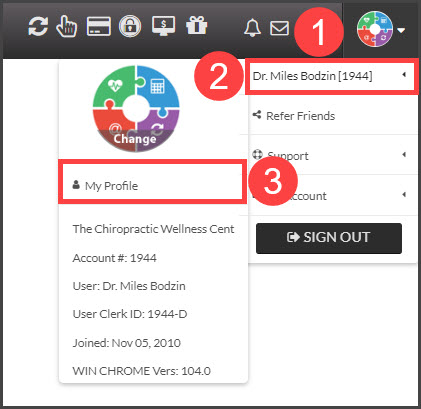
Step 1: From the [User Profile], hover over the Owner's Name → click on [My Profile].
Image

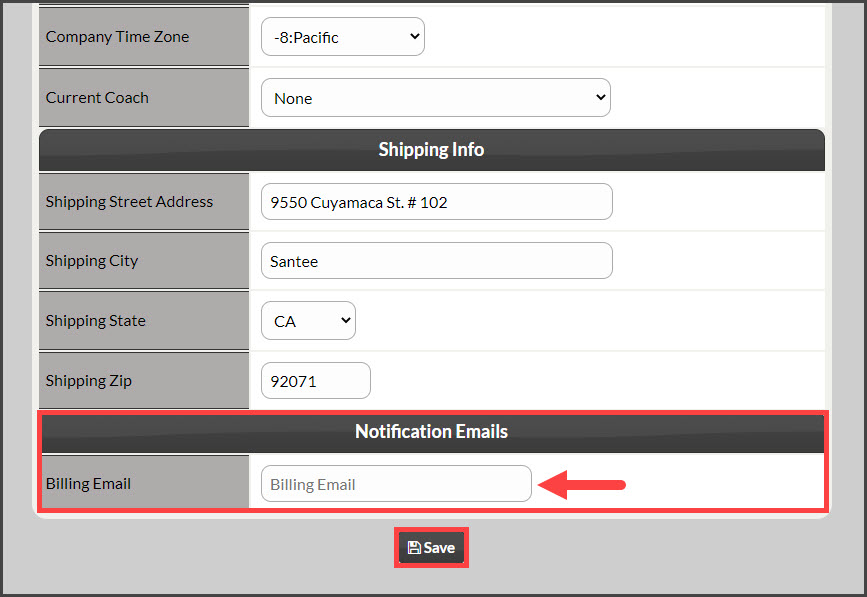
Step 2: At the bottom of the page, under [Notification Emails] enter the email address you would like to have any membership billing emails go to (it will also be sent to account users). These notices are only related to membership dues that are declined, expired billing, etc. Click the [Save] button at the bottom of the screen.
Image

Did you find this article helpful?
Previous

Tax Reporting: Will Cash Practice® Systems provide me with a W-9 or Tax ID #?

Next

© 2026 Cash Practice Systems. All rights reserved.