
Logo

Cash Practice® Systems Help Center

Search our knowledge base to get answers to your questions, access video training & more!

Updating Information: How do I update my address, phone, or fax number?

My Account Guide

Updating Information: How do I update my address, phone, or fax number?

The company address will be displayed on care plans, payment receipts, authorization forms, reports, emails and more.

Last updated on 14 Sept, 2025

Getting started:

Step 1. Head to the [User Profile] in the top right corner of the Cash Practice website. Hover the mouse over the Admin name, and select [My Profile]
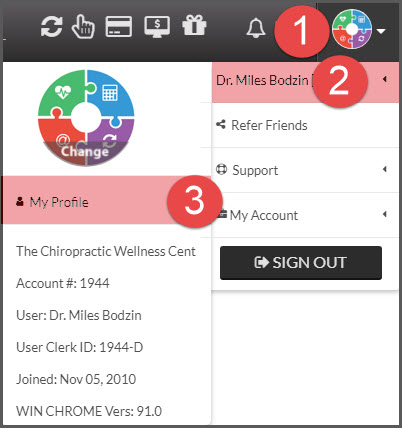
Image

Step 2: Scroll down to the [Company Information] section and edit any applicable information. Cash Practice requires members to have a company address. Here's why.
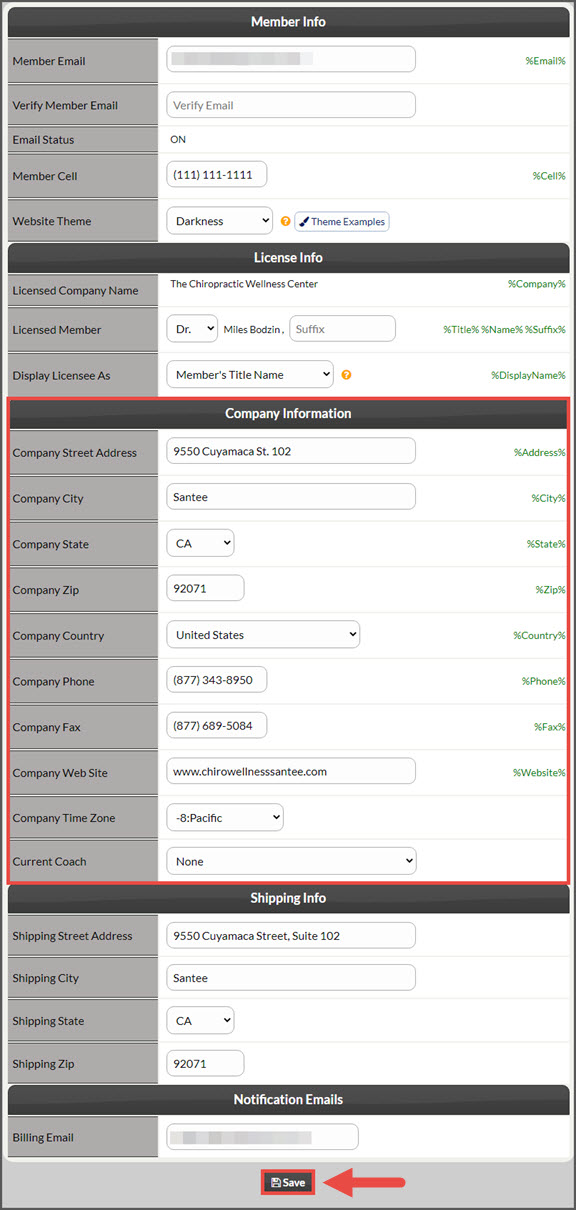
Image

Step 3: Click on the [Search] button at the bottom of the page.


If your office has an active merchant account with us, our Merchant Services Department will be reaching out to you to update this corresponding information with the processing bank.  

Did you find this article helpful?
Previous

Account Users: Where can I edit account user login times?

Next

© 2026 Cash Practice Systems. All rights reserved.