Why would I want to upload my company logo to my Cash Practice® account?
Your company logo will be used in the headers of your Auto-Debit System® receipts, Care Plans, emails sent from your Drip-Education® System, and Wellness Reports. This is a great way to customize and personalize your content.
Click the Self Help button to use the Cash Practice® walkthrough when logged into your account.

To upload or change the company logo:
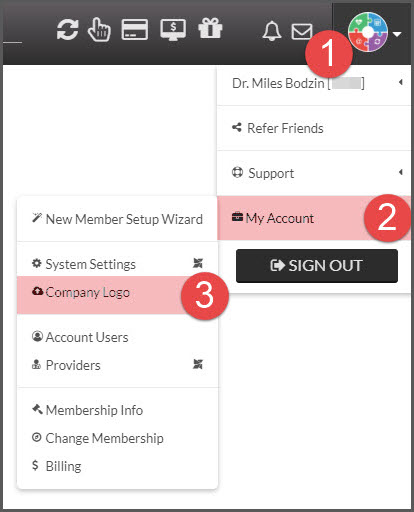
Step 1: From the User Profile menu → click on [My Account] → [Company Logo]
NOTE:
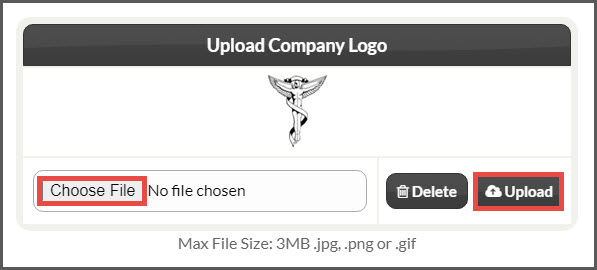
Step 2: Under the [Upload Company Logo] page, click the [Choose File] button to locate the image file from your computer → Then click the [Upload] button. The image file must be a .gif, .jpg or .png format. Max file size is 1MB.
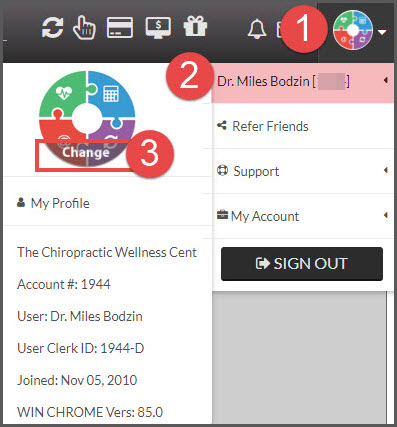
To upload or change a profile photo:
Click the Self Help button to use the Cash Practice® walkthrough when logged into your account.

Step 1: To upload your photo, hover over the User Profile→ hover of your name at the top of the drop-down menu→ select the [Change] button → update and save.