
Logo

Cash Practice® Systems Help Center

Search our knowledge base to get answers to your questions, access video training & more!

Shortcuts: How do I make a desktop shortcut?

Other

Shortcuts: How do I make a desktop shortcut?

Creating a desktop shortcut to a website you frequently visit is useful. It allows you to double-click the icon from your desktop to launch the browser and open the website. The desktop icon will open the website in the browser you used when creating the shortcut.

Last updated on 14 Sept, 2025

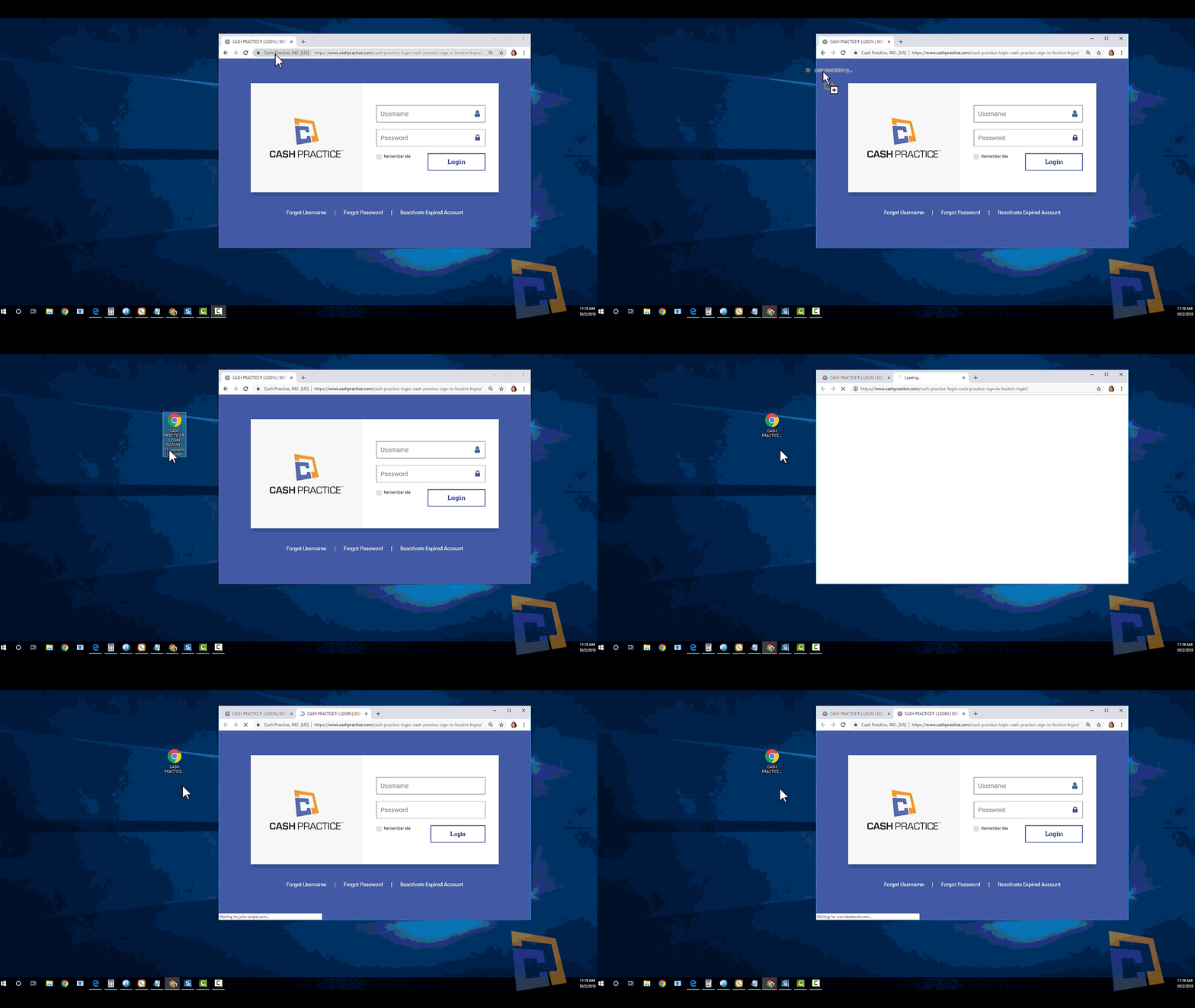
The following steps will guide you through the process of creating a desktop shortcut to a website using Firefox or Chrome.

1) Resize your Web browser so you can see the browser and desktop on the same screen.

2) Left-click the icon to the address bar's left side. This is where you see the full URL to the website.

3) Hold the mouse button and drag the icon to your desktop. This creates a shortcut.

After creating the shortcut you can right-click on the icon and select Rename to edit the text description.
Image


Did you find this article helpful?
Previous

Support: How do I contact Cash Practice Systems?

Next

© 2026 Cash Practice Systems. All rights reserved.