
Logo

Cash Practice® Systems Help Center

Search our knowledge base to get answers to your questions, access video training & more!

Plans: How to present care plans to your patients/clients

Care Plan Calculator® System (Forecasting Care)

Plans: How to present care plans to your patients/clients

Once you have created your financial plan using the Care Plan Calculator System and the patient has said YES to the treatment plan, you can now present them with their financial plan. We have helpful tips and tools for you to use when presenting this plan confidently and clearly without coming off like a pushy salesperson. 

Last updated on 12 Sept, 2025

READ: 

  • Master Your Day 1 & 2 Script

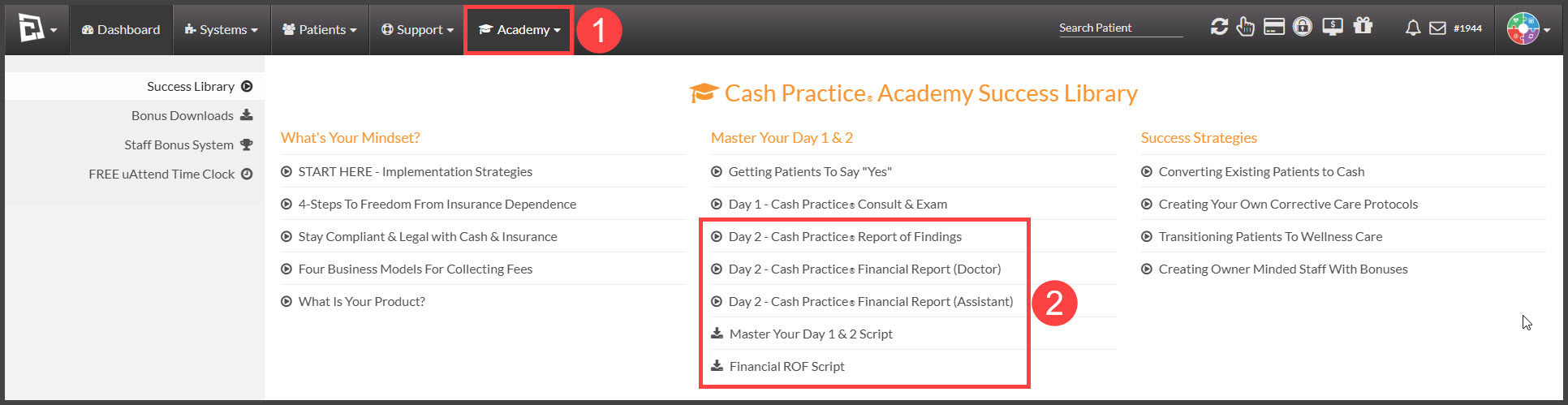
    • After logging in to your Cash Practice Systems account, hover over the [Academy] menu → [Master Your Day 1 & 2 Script] or [Financial ROF Script]

WATCH

  • "Master Your Day 1 & 2" series of coaching videos with Dr. Miles Bodzin, CEO of Cash Practice Systems.

    • Hover over the [Academy] menu → [Master Your Day 1 & 2] section.
Image


  • In addition to the Academy, you can access Power Hour recorded sessions from your account by clicking on the CP Power Hour image on the dashboard.

Did you find this article helpful?
Previous

Plan Settings: How do I determine which person in a family is 1st, 2nd, 3rd+?

Next

© 2026 Cash Practice Systems. All rights reserved.