
Logo

Cash Practice® Systems Help Center

Search our knowledge base to get answers to your questions, access video training & more!

Auto-Debits: How do I see a list of all completed auto-debits?

Auto-Debit System® (Frictionless Payments)

Auto-Debits: How do I see a list of all completed auto-debits?

Last updated on 13 Sept, 2025

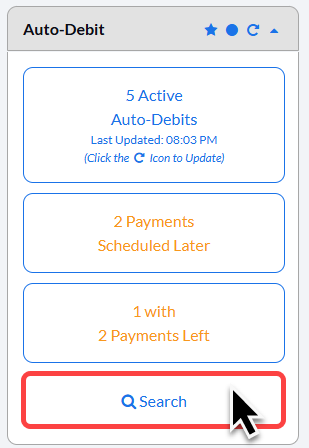
Step 1: From the right side of the Dashboard, click on the [Search Auto-Debits] button.
Image

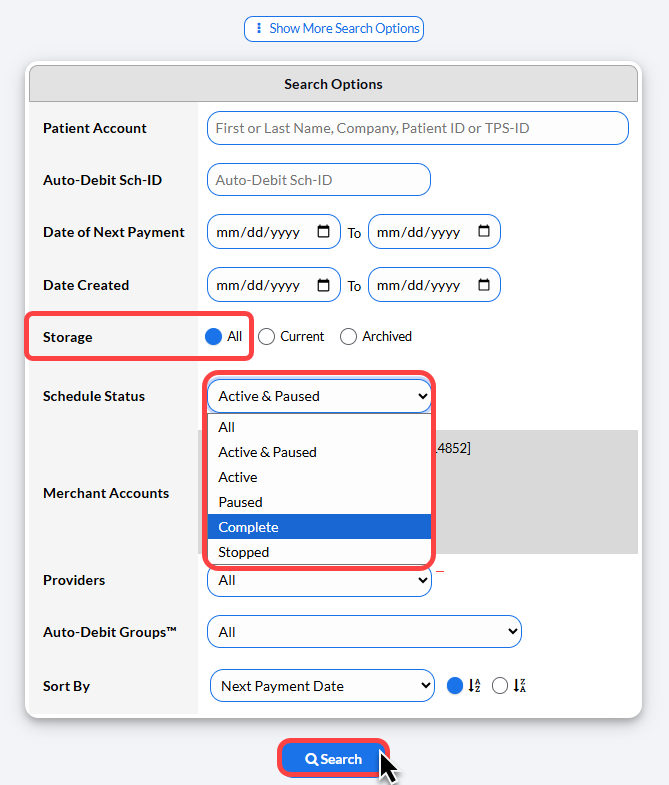
Step 2: From the Search Options page, change the [Storage] to be displayed as [All] and the [Schedule Status] to be displayed as [Complete]. Then click [Search] at the bottom of your page to see all of your completed Auto-Debits displayed. 
 

Image


Did you find this article helpful?
Previous

FAQ: How long does it take for a refund to process?

Next

© 2026 Cash Practice Systems. All rights reserved.