

Why should I archive?
It is important to archive your payments after you post them to the patient ledgers. This way, when you view the Payments Report, the transactions that are shown there are only the current ones that require action. Click HERE for more information on the Posted Payments Report Generator.
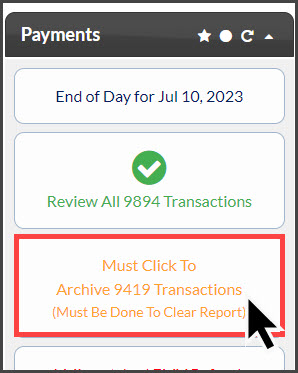
Step 1: From the Dashboard, under the [Payments] section: Click on the button that states [Must Click to Archive X Transactions].
Please note: [Must Click to Archive X Transactions] indicator button will only display on the Payments Status Report when your Posted Payments Report™ has over 350 transactions that need to be archived. You must archive from your Payment Status Report before you can view the Posted Payments Report™.
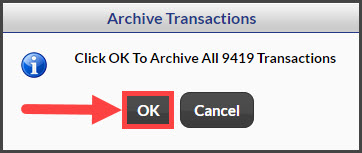
Step 2: Confirm you want to archive the accepted transactions. Then, select [Yes] to allow.
Step 3: The Payments Status Report will load stating how many transactions have been archived. Only transactions that do not require any action can be archived. Click HERE for more information on how to handle declined payments.