
Logo

Cash Practice® Systems Help Center

Search our knowledge base to get answers to your questions, access video training & more!

Payments: How to view or print the patient billing history from the Payments Report

Auto-Debit System® (Frictionless Payments)

Payments: How to view or print the patient billing history from the Payments Report

Last updated on 03 Mar, 2026

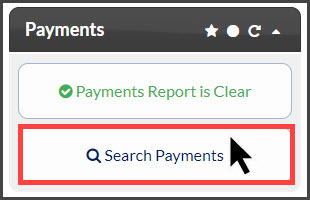
Step 1: From the Dashboard, click on the [Search Payments] shortcut button located under the "Payments" section. 
Image

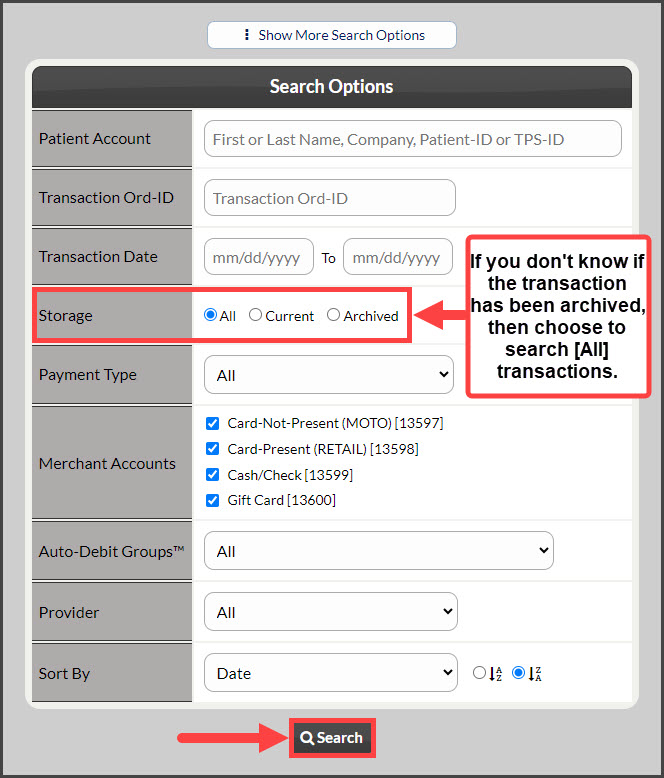
Step 2: From the Search Options page, fill in your search criteria and click [Search]. Once you click search, you will see the Posted Payments Report reflecting your criteria.
Image

Note: Steps 3-4 are for printing the billing history.

Step 3: On the right-hand side, select the [Printer Friendly Reports] drop-down menu. Then choose which type of report you would like to generate.

Image

Step 4: Once the report loads, click on the logo at the top left to print the report. 

Image

Did you find this article helpful?
Previous

Payments: I have 350+ transactions on my Payments Report, how can I mass archive?

Next

© 2026 Cash Practice Systems. All rights reserved.