

While it is rare, we advise against allowing sign-ups for "Option 1" (recurring payments). Instead, kindly suggest they choose either "Option 2" (Initial + Recurring) or "Option 3" (pre-pay).
Please note that the Auto-Debit Objection Script is included with access to the Auto-Debit System. Cash Practice prioritizes safety and follows PCI compliance regulations. Still, if a patient expresses doubts about storing their billing information, this script can help reassure them in your office.
Getting Started:
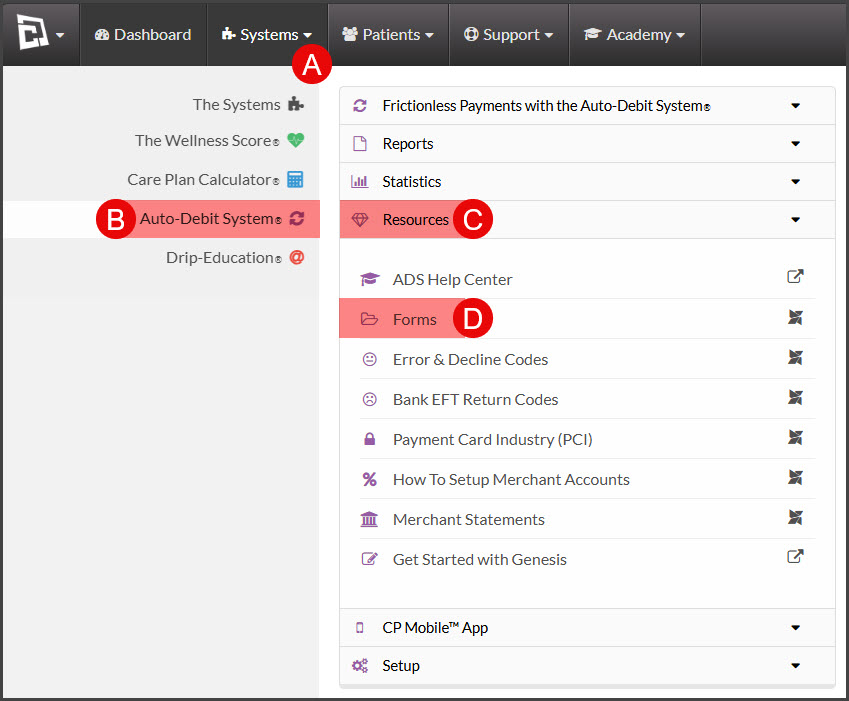
Step 1: Follow the sequence below.
A: Hover over the [Systems] menu
B: Click on [Auto-Debit System]
C: Select [Resources]
D: Choose [Forms]
Step 2: Click on the link "Auto-Debit Objection Script"
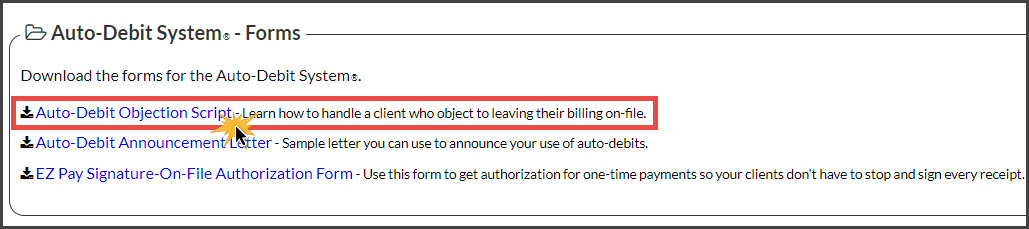
Step 3: This will then load the script in a downloadable PDF format.