
Logo

Cash Practice® Systems Help Center

Search our knowledge base to get answers to your questions, access video training & more!

Managing Bounced/Returned Emails: Bounced Email Report

Patients Section Guide

Managing Bounced/Returned Emails: Bounced Email Report

When emails are sent to your patients, they can be returned (bounced) for a variety of reasons. The best way to prevent emails from being returned/bounced is to ask your patients to add your email address to their email address book (contacts) and/or their email white-list. To view a list of patients whose emails have been bounced, follow these steps:

Last updated on 14 Sept, 2025

Getting started:

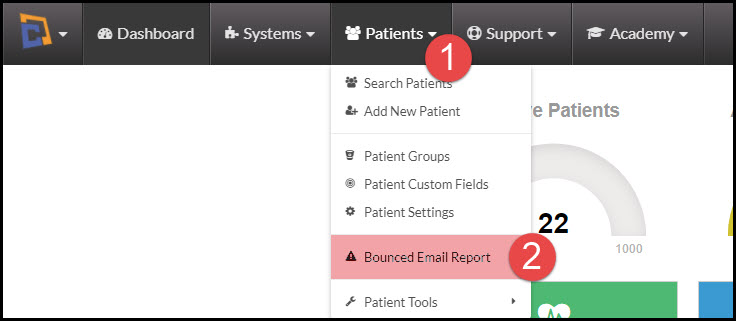
Step 1: Hover over the [Patients] drop-down menu, and select [Bounced Email Report].
Image


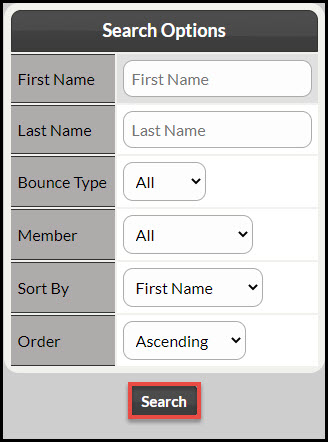
Step 2: This will bring up the search options page, you can search for a specific patient or a specific bounce type. It also allows you to specify how the results will display. If you would like a current report of all of your bounced emails, simply select [Search].
Image

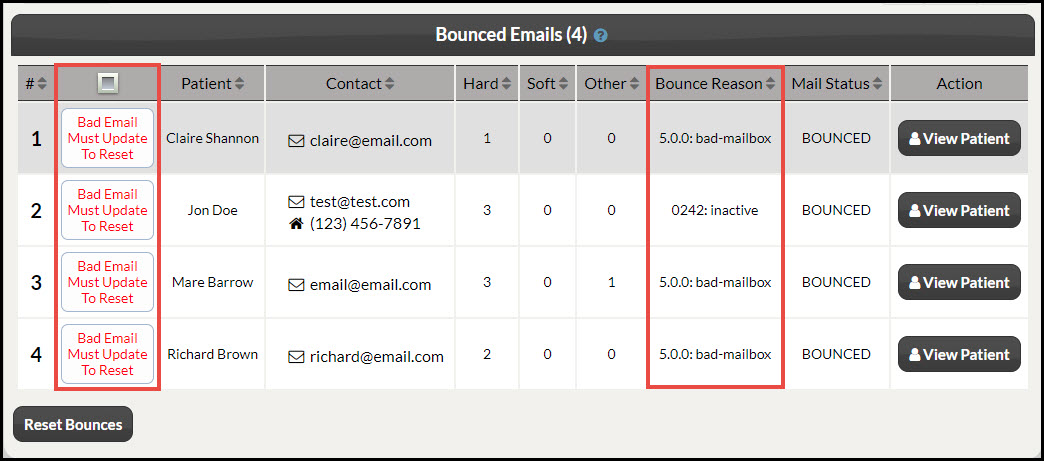
Step 3: This will now display your patients who have email addresses that have bounced, and display the reason for their bounce.
Image


Step 4: Once you have determined whose emails bounced and how you will need to take action on them. Click here to learn: What to do with Bounced Emails.


Did you find this article helpful?
Previous

Managing Bounced/Returned Emails: What do I do with bounced emails?

Next

© 2026 Cash Practice Systems. All rights reserved.