

Here at Cash Practice® Systems, we take account security very seriously and require passwords for all users to be updated regularly. If you would like to be notified by email before this takes place, we have just the setting! This is only available to be selected in the Admin account or by users who have this permission. When this feature is turned on, it sends password expiration emails to all users within the account.
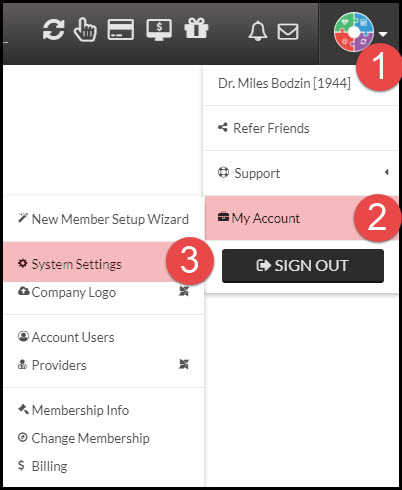
Step 1: Hover mouse over the [User Profile] on the top right side of the web page.
Step 2: From the drop-down menu, select [My Account] → [System Settings].
Step 3: Locate the [Account User's Password About to Expire] setting, and turn this from OFF to ON, using the slider selection tool. NOTE: The email is set to send 4 days before the password expires.
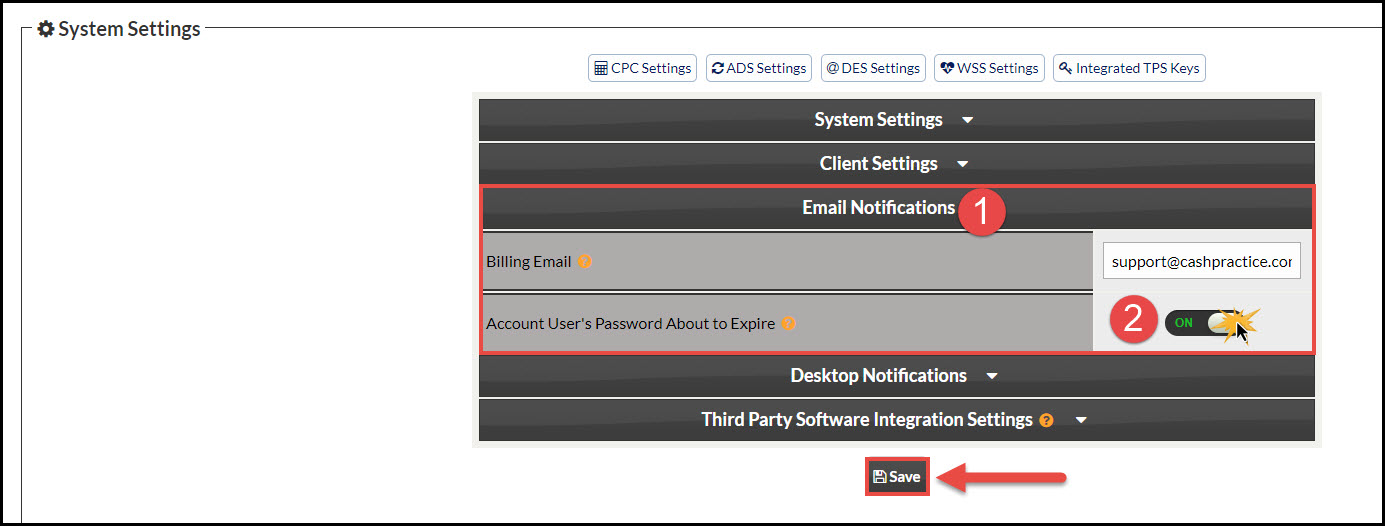
Step 4: Once finished, click the [Save] icon at the bottom of the page to save your changes.