
Logo

Cash Practice® Systems Help Center

Search our knowledge base to get answers to your questions, access video training & more!

Account: Where can I find my Cash Practice® account number?

My Account Guide

Account: Where can I find my Cash Practice® account number?

Last updated on 14 Sept, 2025

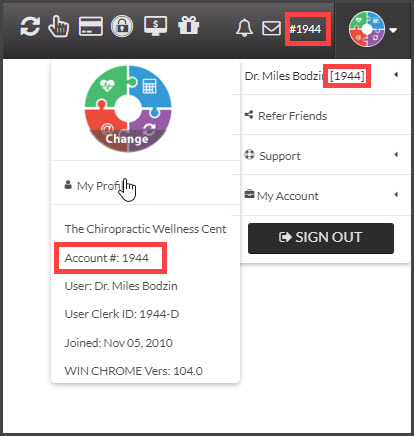
When logged into your account, locate the number on the top-right side of your account next to the #0000, or hover your mouse over the [User Profile] menu in the top right corner. (See image)

Your account number will be displayed, next to your name. It is important that you make note of your account number as you will be asked to provide it when contacting Cash Practice® for assistance by phone or email.
 

Image

Did you find this article helpful?
Previous

Associates & Providers: How do I add an Associate/Provider?

Next

© 2026 Cash Practice Systems. All rights reserved.