
Logo

Cash Practice® Systems Help Center

Search our knowledge base to get answers to your questions, access video training & more!

Account Users: How do I upload a photo to my user account?

My Account Guide

Account Users: How do I upload a photo to my user account?

Last updated on 14 Sept, 2025

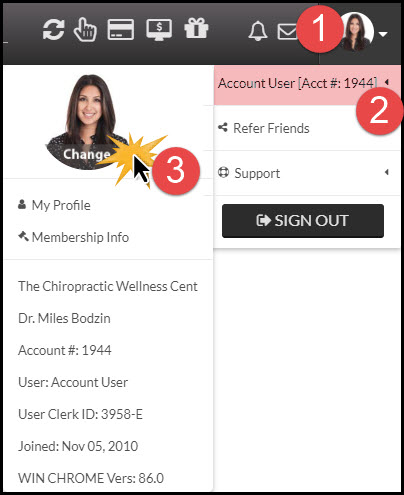
Step 1: Log into your user account in Cash Practice®→ hover over the [User Profile] in the top right-hand corner→ hover over [Your Name] → click on the [Change] button.
Image


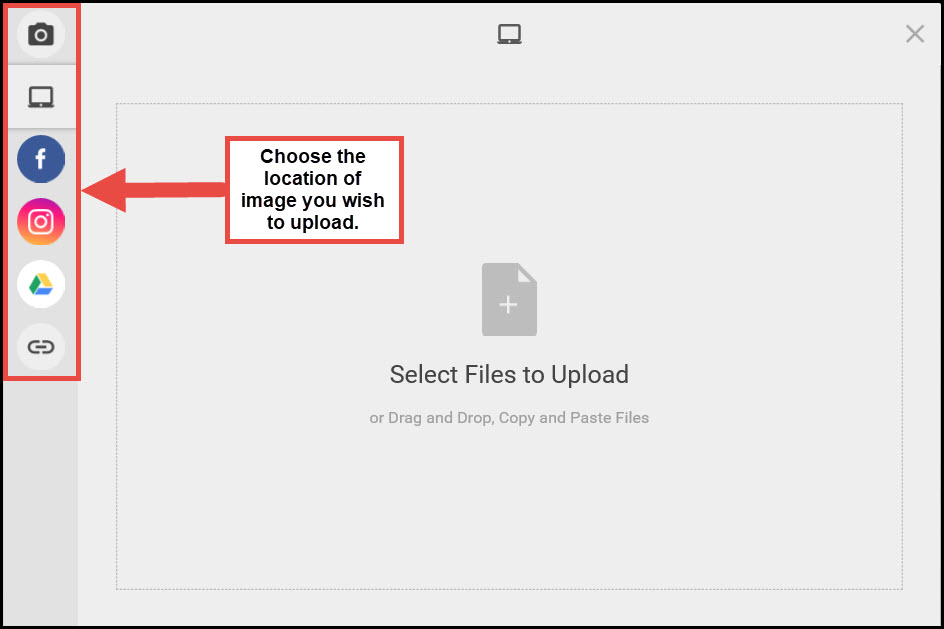
Step 2: A new page will load, and you will select the location of the image you wish to add to your User Profile. Once finished, select [Choose File].
Image

Step 3: When properly selected and downloaded, the Cash Practice® website with re-load with your new image.

Did you find this article helpful?
Previous

Account Users: Why can't an account user edit their own permissions?

Next

© 2026 Cash Practice Systems. All rights reserved.