

The Future of Payment Tools: Continuous Upgrades for Your Practice
We’re on a mission to eliminate daily practice friction, save your team valuable time, and make patient payments effortless. Rather than making you wait for a huge overhaul, we’re rolling out continuous upgrades starting right now.
Consider these new tools a small taste of what’s to come—we have a steady stream of fresh updates dropping over the next few months to keep your practice running as smoothly as possible!
Join the Members-Only Facebook Group Here.
Pre-Debit Email Notifications
Proactive Payment Reminders ✅
Looking for an easy, automated way to keep your patients informed about upcoming recurring charges?
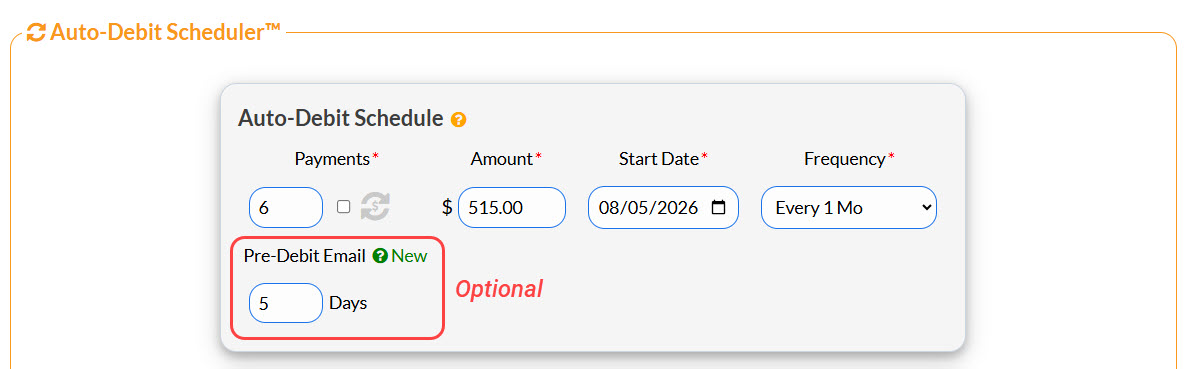
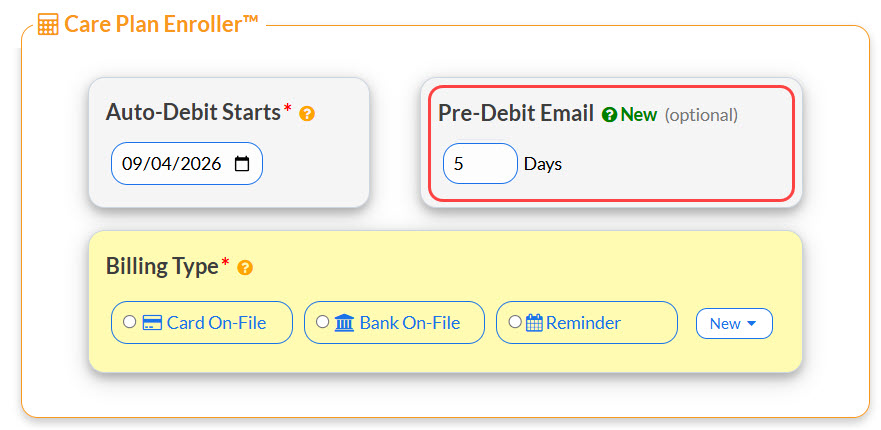
Pre-Debit Email Notifications can now be activated to remind your patients of their upcoming Auto-Debit Payment. While setting up or editing your patient's Auto-Debit, simply choose the number of days before their recurring payment to send an email notification.
You'll see the Pre-Debit Email setting when using the Auto-Debit Scheduler:
You'll also see the Pre-Debit Email setting when using the Care Plan Enroller:
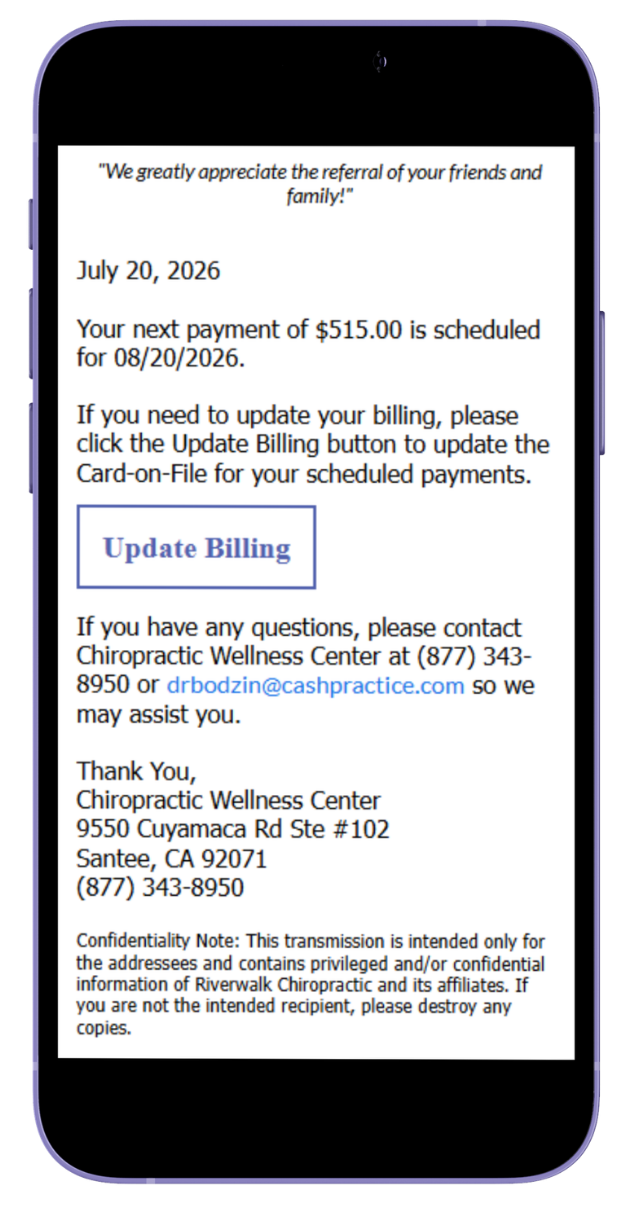
Here's an example of what the Pre-Debit Email looks like, which includes a link for the patient to update their billing if they need to:
Why You’ll Love It
Customizable Lead Time: Set exactly how many days in advance your automated reminder emails go out before a scheduled charge.
Self-Service Convenience: Patients get a secure, direct link to update their billing details on their own time before the transaction runs.
Protect Recurring Revenue: Stop chasing declined payments and safeguard your cash flow without raising a finger.
Enhanced Visual Card Interface 💳
Ever had your team squinting at a long, messy text dropdown list, trying to guess which card on file is active before running a charge?
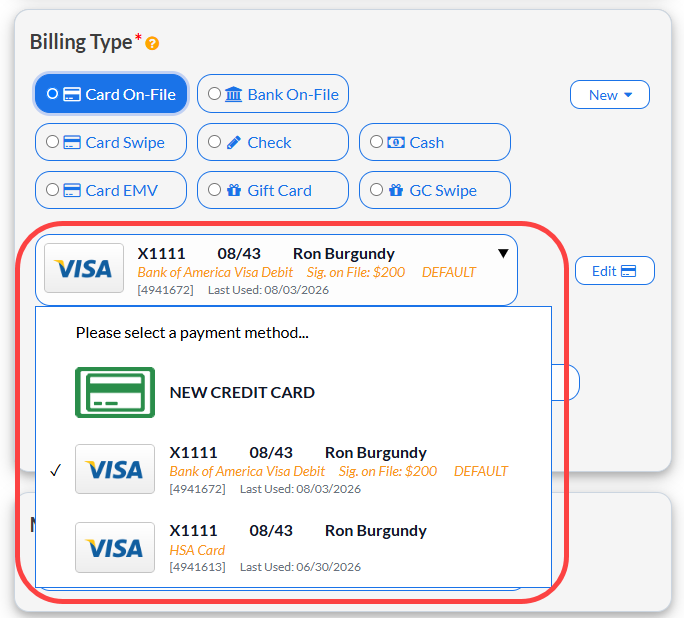
Our Solution: We’ve modernized your payment workspace! Card details are now displayed in a clean, visual card format right on screen, giving your staff full visibility and confidence.
Why You’ll Love It
Clarity at a Glance: Instantly spot card type logos (e.g., VISA), expiration dates, default statuses, card nicknames, and last-used dates without searching through text.
Faster Checkout: Confirm payment details in a fraction of a second to keep your checkout line moving.
Familiar & Modern: Enjoy a clean, rounded visual design while keeping all standard workflows right where you expect them.
Service Date Field (ClinicMind Users Only) 📅
Enhanced Accuracy with Service Date Change
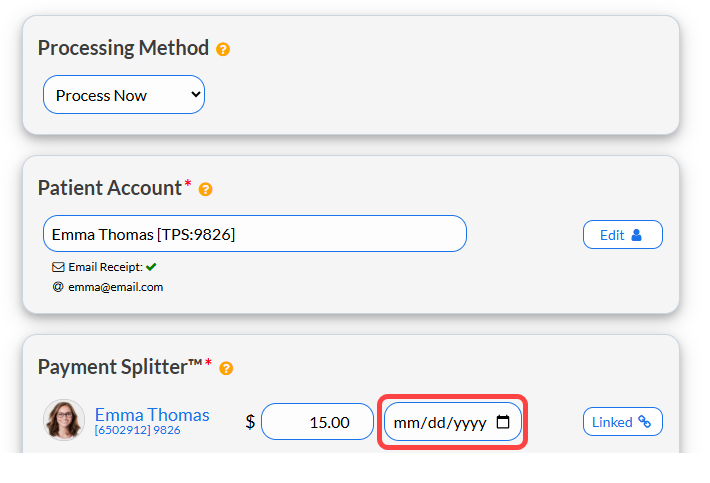
With the new editable Service Date feature, collecting payments is now even more precise for our ClinicMind users. Your team can now enter a specific Service Date directly alongside the payment amount in the Payment Splitter™ section when processing transactions
Why You’ll Love It
Single-Step Precision: Match clinical care and billing seamlessly right at the moment of payment.
Zero Discrepancies: Eliminate ledger confusion by aligning transaction receipts directly with the actual date of service.
🔮 This is Just the Beginning...
Stay tuned—there is so much more to come!