
Logo

Cash Practice® Systems Help Center

Search our knowledge base to get answers to your questions, access video training & more!

ChiroHD: How to Sync Payments from Cash Practice

ChiroHD Integration and Training

ChiroHD: How to Sync Payments from Cash Practice

Payments will auto-post, but if there is ever an issue, click the sync button within ChiroHD. The article below will walk you through this simple process.

Last updated on 14 Sept, 2025

Getting started:

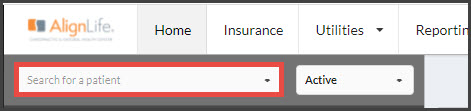
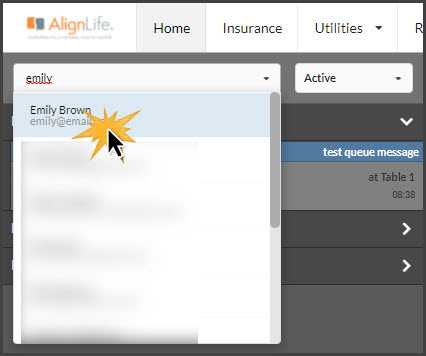
Step 1: In ChiroHD, use the search field to the left of the schedule to locate the patient the transaction needs to be run for and select them from the drop-down menu.
ImageImage

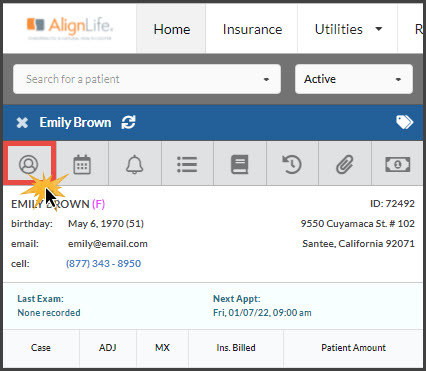
Step 2: Once loaded, click the [Profile] button.
Image

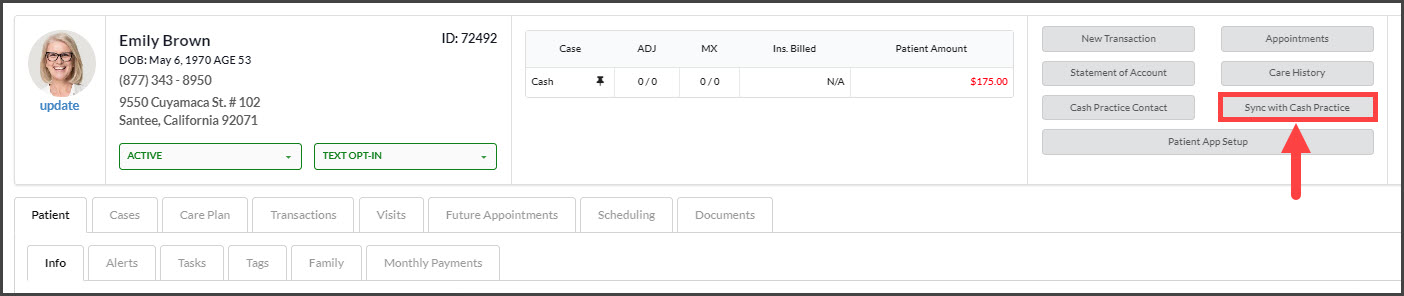
Step 3: Select the [Sync with Cash Practice] button. This will update or pull over any transactions that have not been pulled over from Cash Practice to ChiroHD. 
Image

If you need additional assistance, please contact Support@CashPractice.com or (877) 343-8950 x102

Did you find this article helpful?
Previous

ChiroHD: How to create a new patient account without charging the patient

Next

© 2026 Cash Practice Systems. All rights reserved.