
Logo

Cash Practice® Systems Help Center

Search our knowledge base to get answers to your questions, access video training & more!

Patient Groups: How do I search for patients assigned to a specific group?

Patients Section Guide

Patient Groups: How do I search for patients assigned to a specific group?

Last updated on 14 Sept, 2025

Why would I want to search for Patient Groups? 
Patient groups give you the ability to group your patients based on whatever parameters you would like. You can then use this to keep track of your patients and leads and also efficiently target market.


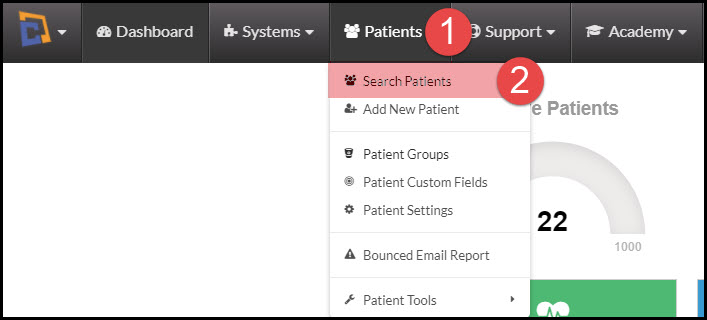
Step 1: Hover over the [Patients] menu→ Select [Search Patients].
Image

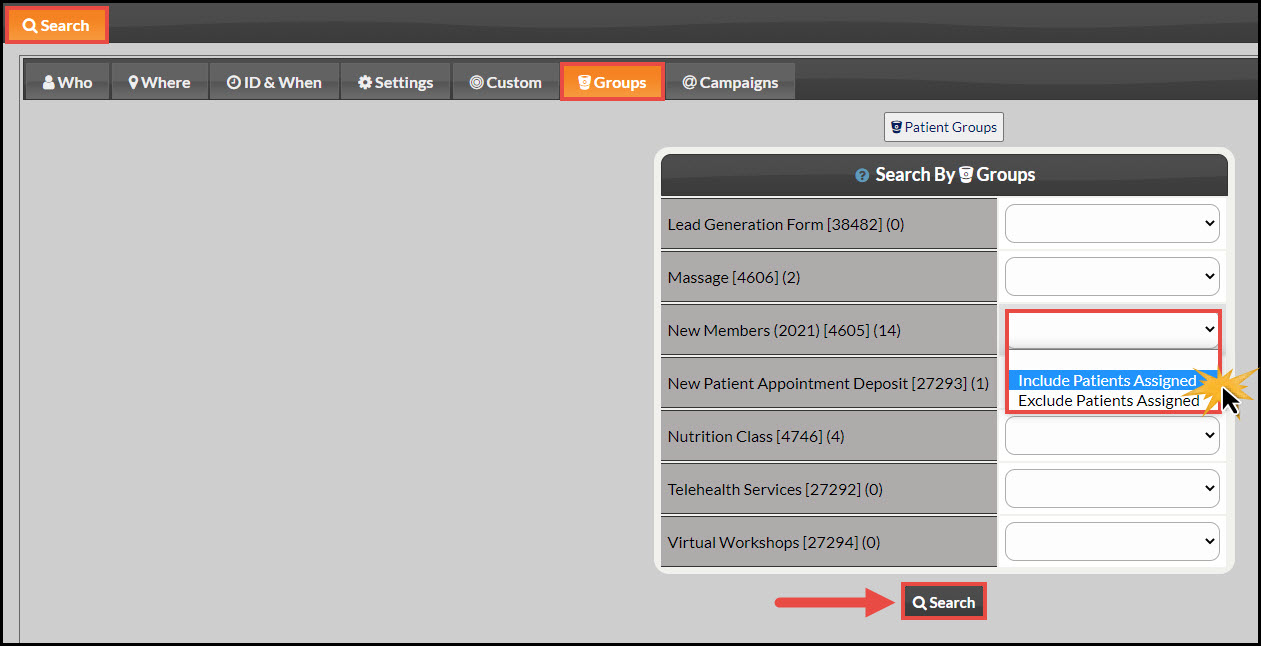
Step 2: Click on the [Groups] tab.

Step 3: Select "Include Patients Assigned" next to the group you want and click [Search].
Image


Did you find this article helpful?
Previous

Assigning Providers: How do I assign a patient to a provider?

Next

© 2026 Cash Practice Systems. All rights reserved.