
Logo

Cash Practice® Systems Help Center

Search our knowledge base to get answers to your questions, access video training & more!

Auto-Debit System® (Frictionless Payments)

Payments: How to locate an archived transaction

When a transaction is archived you may need to locate it in order to perform an action, such as Void, Refund, Send an Email Receipt, etc. 

Last updated on 13 Sept, 2025

How to access an archived transaction:

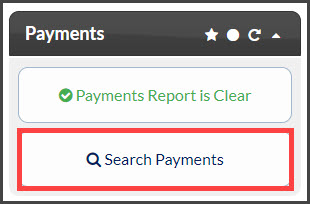
Step 1: From the [Dashboard] under Payments, click on [Search Payments].
Image

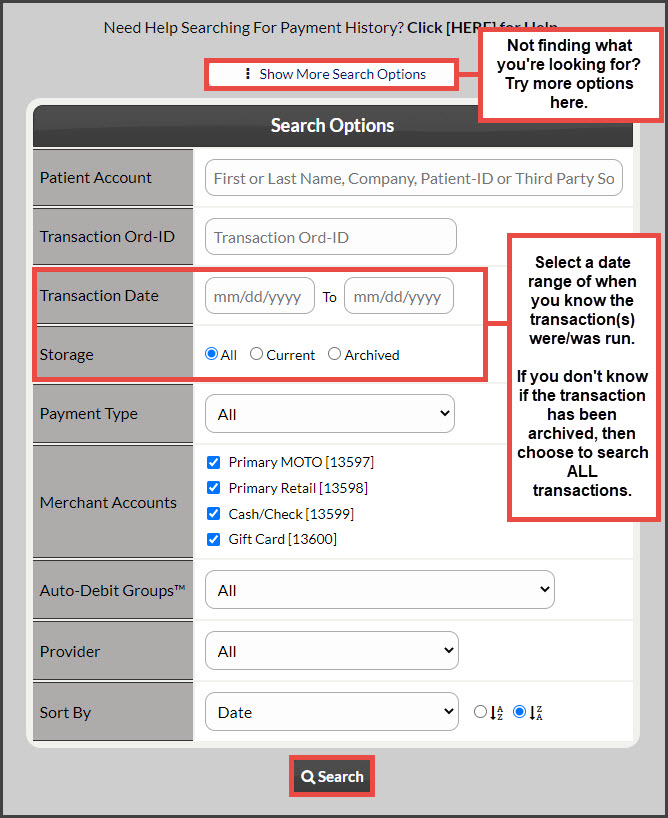
Step 2: In the [Search Options] designate your search options for the transaction(s) you would like to view (i.e.enter the date range). Be sure to change the [Storage] field from "Current" to "All" or "Archived" then click [Search] at the bottom of the page to produce the report.
Image


Did you find this article helpful?
Previous

Payments: How to email a past receipt to a patient

Next

© 2026 Cash Practice Systems. All rights reserved.