
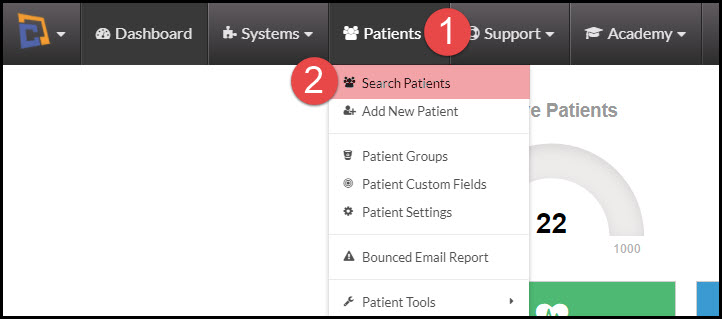
Step 1: From the Dashboard, hover your mouse over the [Patients] menu in your navigation bar and click on the [Search Patients].
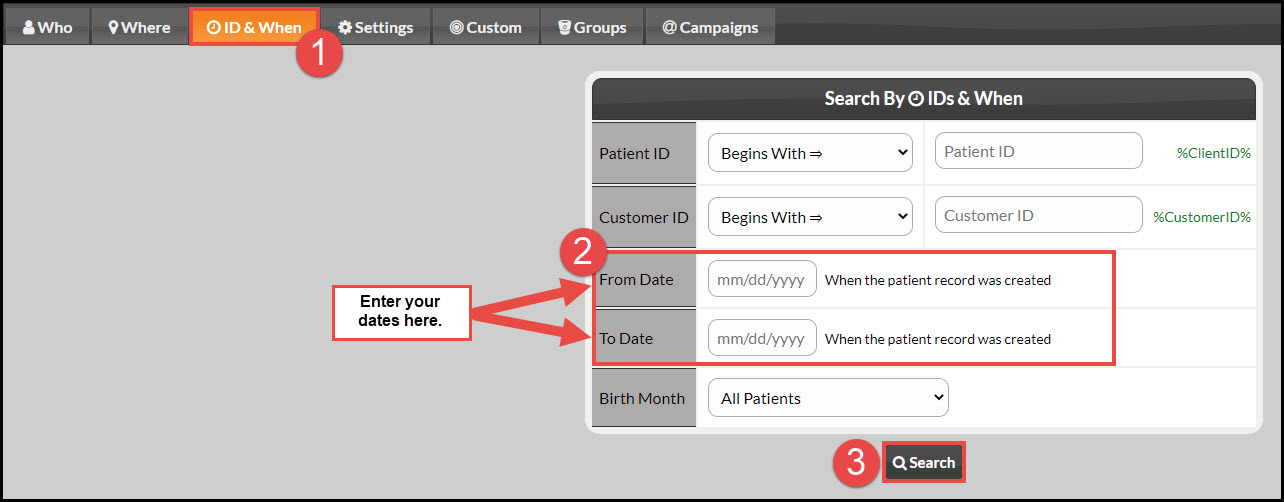
Step 2: Next, click on the [ID & When] tab → enter your dates in the "From Date" and "To Date" fields → click [Search].

Cash Practice® Systems Help Center
Search our knowledge base to get answers to your questions, access video training & more!
How to Pull a List of Patients Who Were Added Into Cash Practice During a Certain Time Frame
Patients Section Guide
Do you need to locate your new patient's patient account but can't quite remember their name? As long as you remember the time frame from when they were added in as a patient, it's easy to locate them!
Last updated on 14 Sept, 2025
Step 1: From the Dashboard, hover your mouse over the [Patients] menu in your navigation bar and click on the [Search Patients].
Step 2: Next, click on the [ID & When] tab → enter your dates in the "From Date" and "To Date" fields → click [Search].