

Getting Started:
Step 1: Locate the plan you wish to delete. See HERE on how to locate your plans.
Step 2: From the search results there are two ways to delete a plan.
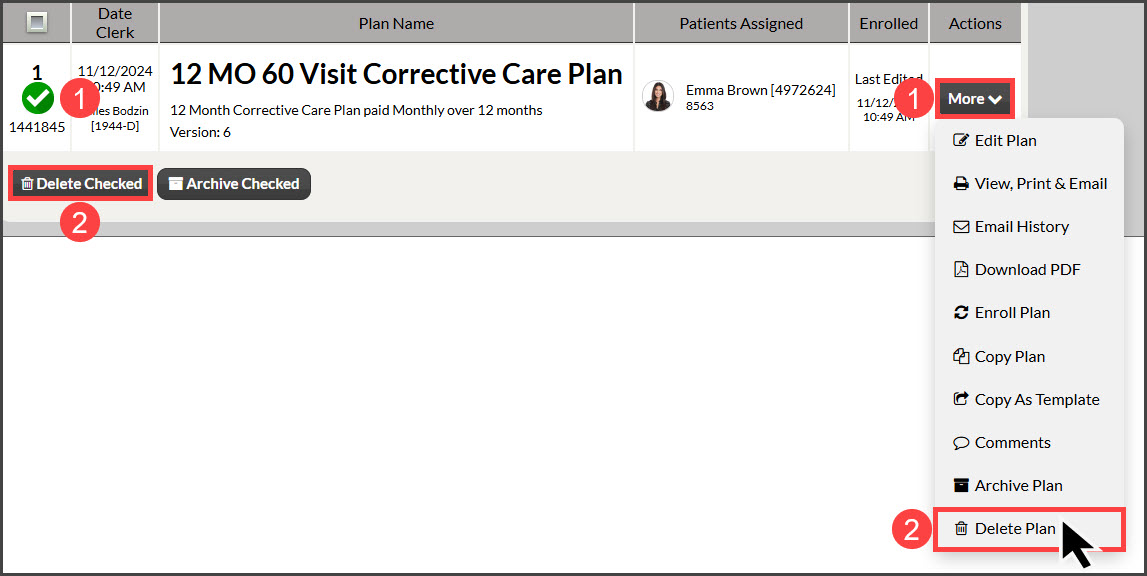
Check the box to the left of the plan, then select the [Delete Checked] button. Click the [OK] to delete.
From the [Actions] button, select [Delete Plan]or [Delete Template]. Then select the [OK] button to delete.
Note: You cannot delete a plan that has been attached to an auto-debit. Instead, you can [Archive] the plan.
Can't see the [Delete] option? If you are unable to see this as the image displays, have your Account Owner/Admin verify that your User Account has the "Delete Plans" permission allowed. Click HERE for more information on Permissions.