Logo

Cash Practice® Systems Help Center

Search our knowledge base to get answers to your questions, access video training & more!

Manage Plans: How to search when care plans were enrolled

Care Plan Calculator® System (Forecasting Care)

Manage Plans: How to search when care plans were enrolled

Last updated on 13 Sept, 2025

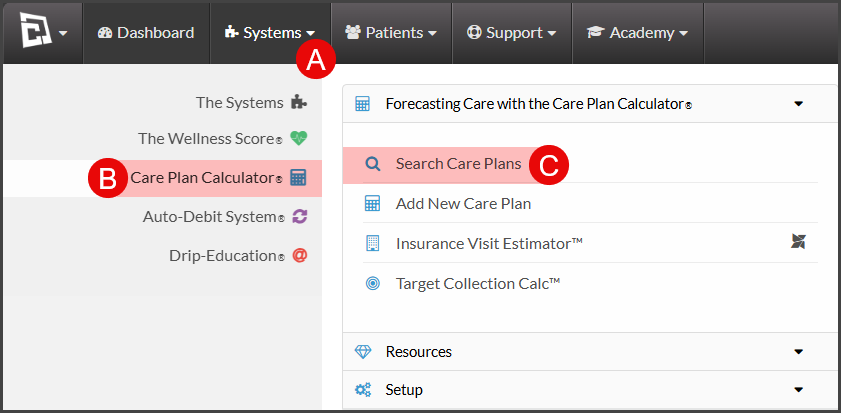
To get started, follow the sequence below. 

  • A: Hover over [Systems]

  • B: Click [Care Plan Calculator®]

  • C: Select [Search Care Plans] 

Image

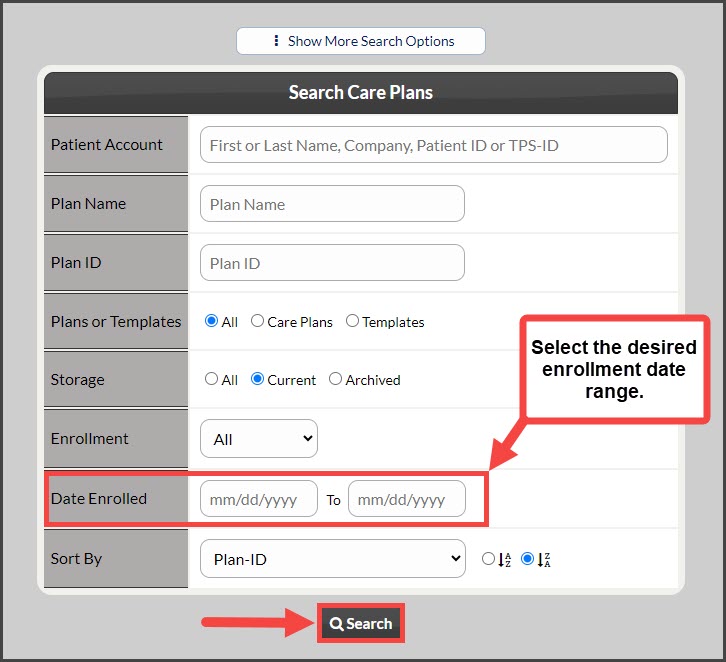
Step 1: Narrow your search by entering the date range for care plans that were enrolled and click [Search]. 
Image

A list of all care plans enrolled during the entered date range will be displayed for review and additional action if needed. 

Did you find this article helpful?
Previous

Add New Plan: How to create a new weekly care plan (Detailed Steps with Pictures)

Next

© 2026 Cash Practice Systems. All rights reserved.