

What Your Office Needs to Do to Get Started:
App Download: Download the app by searching for "Cash Practice" in either the Apple App Store or Google Play Store.

Hardware & Setup: * If you would like to swipe, insert, or tap payments, CLICK HERE to purchase our optional Bluetooth card reader. You will be notified in 2 to 3 business days when your card reader has shipped and your app is ready to use.
If you prefer to manually key-enter card numbers without a reader, please email MerchantAccounts@CashPractice.com to request activation. Please allow 2 to 3 business days for this internal setup to be finalized.
Grant Mobile Permissions: Before anyone can log into the app, the account Administrator must enable mobile device access. CLICK HERE for step-by-step instructions on how to grant mobile permissions.
⚠️ Important Account Policies & Requirements
Account Requirements: Processing transactions within the app requires a Retail Merchant Account and is subject to standard merchant fees.
Gateway Cancellation Policy: If you cancel your CP Mobile™ Gateway (for Android and Apple devices), there will be a $25 fee each time you need to reactivate the gateway.
Take Your Business Anywhere: Cash Practice Mobile
As an Auto-Debit System subscriber, you already have a powerful tool for patient billing. Now, you can extend that efficiency beyond your front desk. The Cash Practice Mobile app empowers you to process secure, one-time payments from anywhere, ensuring your business never misses a beat.
Whether you are at a local health screening, a community marketing event, or handling an off-site consultation, the mobile app provides a seamless bridge between your field operations and your office management.
Key Benefits of Going Mobile
Unified Reporting & Insights: Stop managing multiple sets of books. Every transaction—whether processed in the office or on the road—is automatically synced into your centralized payment report. This provides a complete, real-time view of your revenue stream.
Professional Mobility: Elevate your presence at events. The ability to accept payments instantly, right where the interaction happens, creates a frictionless experience for your clients and removes the need to track down payments later.
Operational Efficiency: Maintain the high standards of your Auto-Debit System while you are on the go. You get the same secure, professional transaction experience in the field that you expect at your stationary terminal.
Instant Reconciliation: By consolidating all payments into a single report, you save valuable administrative time, reduce the risk of manual-entry errors, and keep your accounting organized effortlessly.
Key Features & Compatibility
The Cash Practice® Mobile app is designed to integrate seamlessly with your existing workflow:
Full Sync: Automatically connects with your Cash Practice® Account.
Software Integration: If you use an integrated office management program, mobile payments can be imported directly.
Digital Receipts: The system automatically emails customers their receipts the moment a transaction is completed.
System Requirements:
Apple Users: Requires iOS 15.0 or later for both iPhone and iPad.
Android Users: Compatible with current Android OS versions.
Why It Matters
For growing practices, agility is key. The Cash Practice Mobile app removes the limitations of a physical office, allowing you to capture opportunities the moment they arise. By keeping all your transaction data in one place, you maintain total control over your financials, no matter where your work takes you.
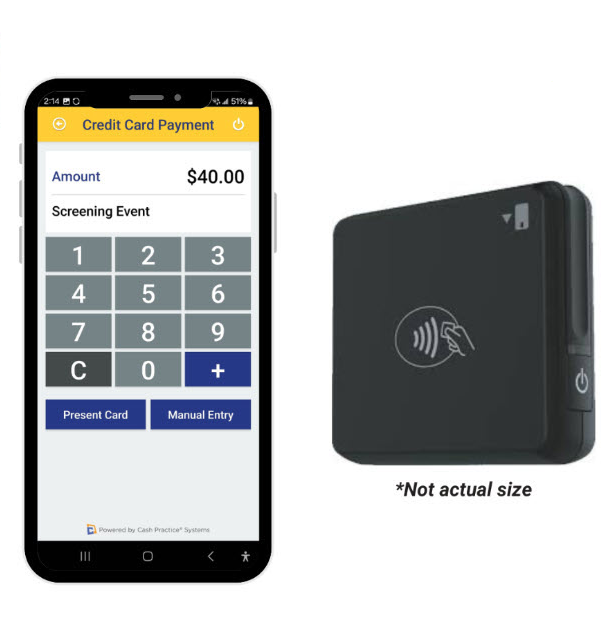
Click HERE to purchase a card reader.