

The Cash Practice® Auto Debit Groups™ allows you to categorize your payments into groups. For example, they allow you to track your Chiropractic Services, Massage Services, Products, Locations, etc. The groups are easy to create! Click HERE for instructions on how to create Auto-Debit Groups™.
NOTE: You can also assign a payment to an Auto-Debit Group™ while processing the payment with any payment tool.
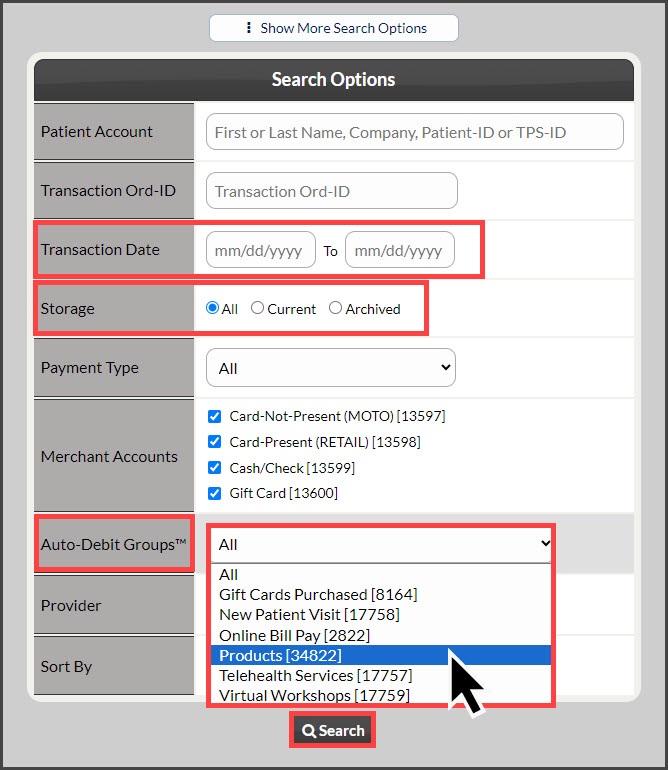
The instructions below review how to pull a report to see how much money was collected for a particular Auto-Debit Group™.
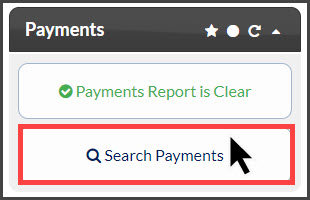
Step 1: From the Dashboard, click the [Search Payments] button under the "Payments" Section.
Step 2: Use the search options to define what transactions you are looking for and click [Search].
Step 4: Once the page has loaded, your search results will display.