Logo

Cash Practice® Systems Help Center

Search our knowledge base to get answers to your questions, access video training & more!

Setup: How do I access the Care Plan Calculator® System Setup?

Care Plan Calculator® System (Forecasting Care)

Setup: How do I access the Care Plan Calculator® System Setup?

Last updated on 12 Sept, 2025

Accessing the Care Plan Calculator® System Setup is an administrative privilege and requires the administrator to be logged into the account.


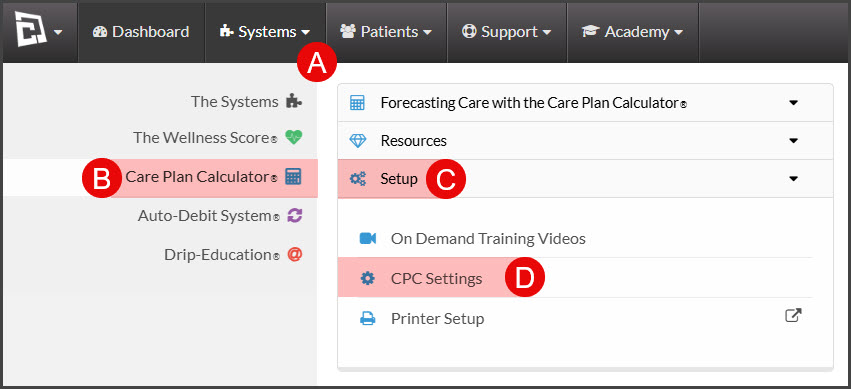
Step 1: Follow the sequence below.

  • A: Hover over the [Systems] menu

  • B: Click on [Care Plan Calculator®]

  • C: Click on the [Setup] drop-down menu

  • D: Select [CPC Settings].

Image

Step 2: Complete the Care Plan Calculator® System Setup: How do I complete the Care Plan Calculator® System Setup?

Did you find this article helpful?
Previous

Setup: How do I determine my Target Collection Level™ (TCL)?

Next

© 2026 Cash Practice Systems. All rights reserved.