
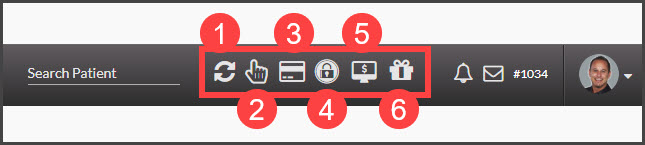
The Auto-Debit System® tools can be easily accessed when logged into your account. Simply click on the payment tool icon in the top right corner of your screen and start processing payments!

Cash Practice® Systems Help Center
Search our knowledge base to get answers to your questions, access video training & more!
Shortcuts: How can I access the Auto-Debit System payment tools quickly?
Auto-Debit System® (Frictionless Payments)
Last updated on 13 Sept, 2025
The Auto-Debit System® tools can be easily accessed when logged into your account. Simply click on the payment tool icon in the top right corner of your screen and start processing payments!