
Logo

Cash Practice® Systems Help Center

Search our knowledge base to get answers to your questions, access video training & more!

Updates: How do I reset my Microsoft Edge browser?

System Guide

Updates: How do I reset my Microsoft Edge browser?

Last updated on 14 Sept, 2025


Image

 How to reset Microsoft Edge settings: 

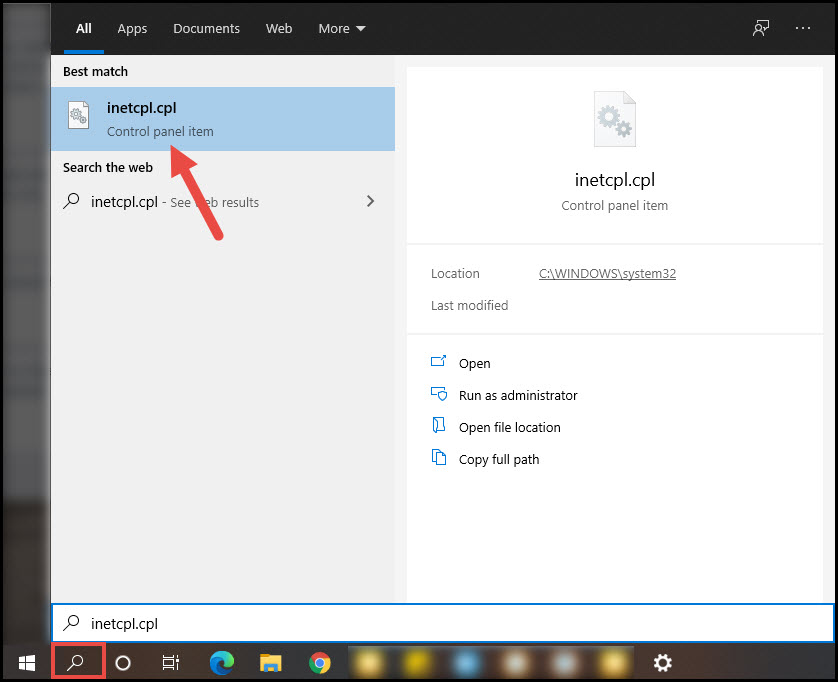
Step 1: Go to your Start Menu.

Step 2: Type "inetcpl.cpl" in the Start Menu search box and click on the control panel item that pops up.
Image


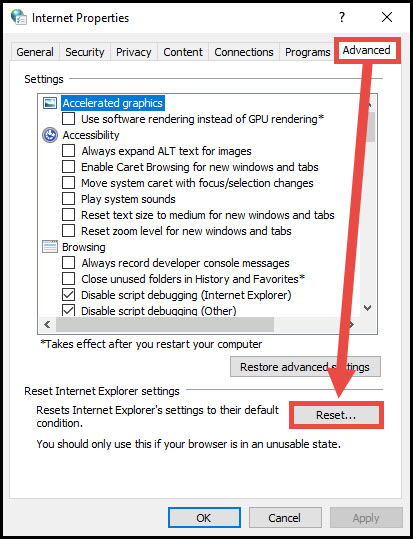
Step 3: Click on the Advanced tab.

Step 4: Click "Reset".
 

Image


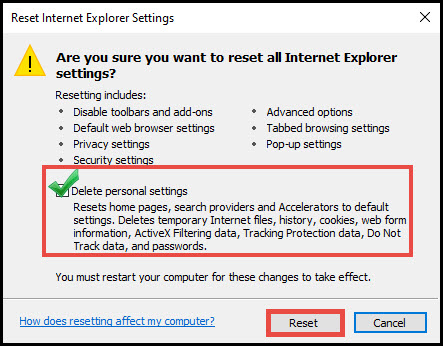
Step 5: Check the box "Delete Personal Settings" and click "Reset".
 

Image


When Edge finishes restoring the settings, click [Close], and then click [OK].


Did you find this article helpful?
Previous

How do I send a secure file to a person or department at Cash Practice®?

Next

© 2026 Cash Practice Systems. All rights reserved.