

Disclaimer: Does the Automatic Card Updater always work? In most cases, yes! It’s a great tool for preventing declines. However, we cannot guarantee a 100% update rate. This is because the service relies on individual banks pushing their new data to the Visa/Mastercard registry. If a bank lags in uploading their files, doesn't participate in the updater program, or blocks updates due to a card being reported stolen or fraudulent, the automatic update will not go through. In those rare cases, you will need to collect the new card details manually.
The Auto-Card Updater (ACU) is a back-end utility that ensures your patients' billing information stays current, even when their physical cards change.
Frictionless Recurring Care
Most payment disruptions aren't caused by a lack of funds, but by simple logistics—a card expires, or a patient receives a new chip card in the mail.
Automatic Expiry Updates: If a patient is on a long-term wellness care plan, their card details are checked weekly. If a card is nearing its expiration, the system attempts to pull the new date without the patient needing to bring their new card to the front desk.
Replacement Card Retrieval: In cases where a card was lost or re-issued with a new number, the ACU works with the issuer to update the Billing Vault. This prevents the "declined" alert from popping up during a busy shift.
Why This Matters for Your Practice
Maintaining Clinical Focus
When a payment fails, it forces a shift in the office dynamic. The staff has to move from a "patient-first" mindset to a "collections" mindset. By automating these updates, the front desk can keep the conversation focused on the patient's care schedule and health goals.
Reducing Administrative Friction
Manually tracking down updated billing info is a time-consuming task for Chiropractic Assistants. Automating the update process allows the team to spend their time on patient engagement and office flow rather than administrative data entry.
Consistency for the Patient
Patients often appreciate not having to remember to bring their new card in for their recurring plan. It creates a smoother experience for them, where their care continues quietly in the background without billing interruptions.
Operational Details
The service is designed to be a low-overhead solution for maintaining a healthy Billing Vault:
Initial Check: A 10-14 day window is required to verify all existing cards in the vault.
Weekly Scans: Active cards-on-file stored in your patient's Billing Vault will be checked weekly for updates.
To learn how to archive a card in the Billing Vault so that it's not checked for updates, CLICK HERE.
To view & manage the full report of cards being checked for updates, CLICK HERE.
Fee: A nominal fee of $0.35 is applied per updated card.
Reporting:
Access a list of your updated cards, by following the instructions HERE
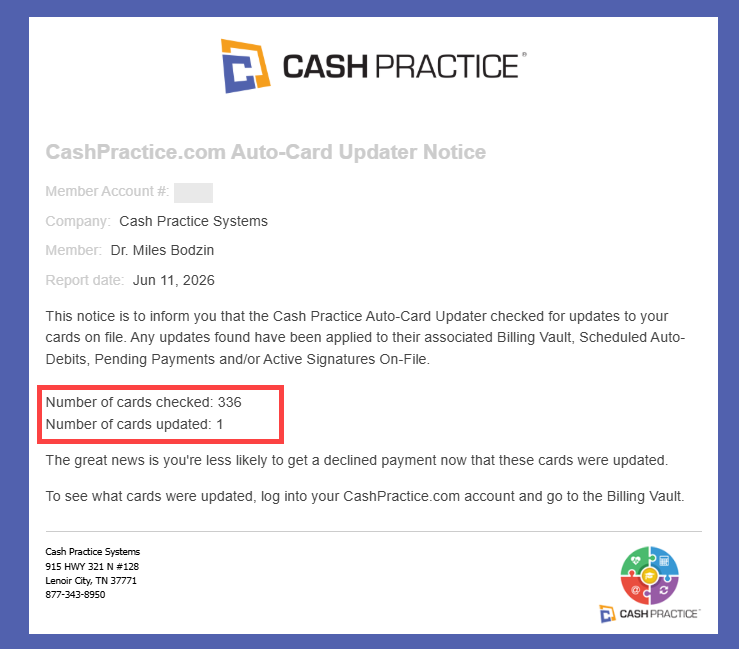
Weekly Reports: The account administrator will receive a weekly email summary showing the total number of cards checked and updated.
Managing Your Billing Vault
Archive any cards for patients who are no longer under active care. This keeps the weekly scans focused only on your active, recurring patient base