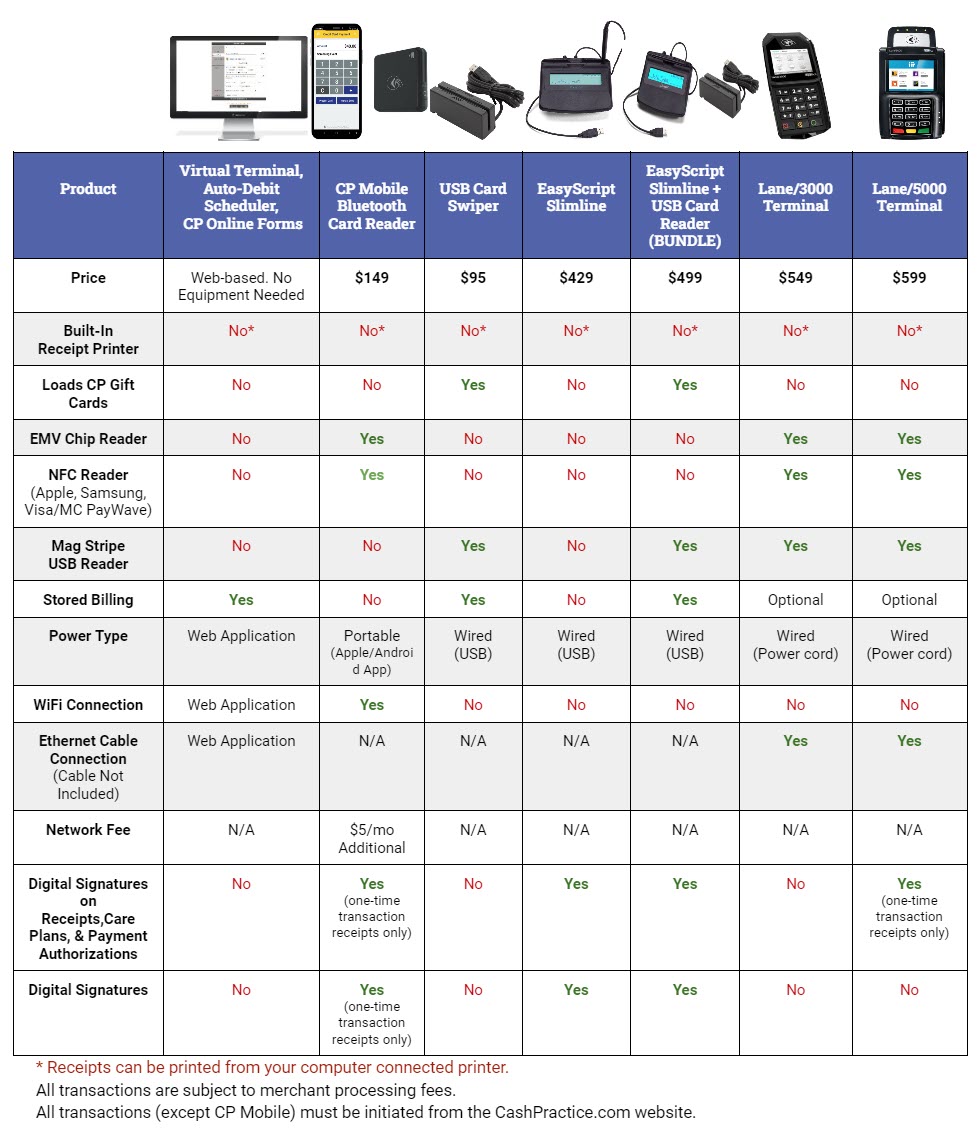
The short answer: You don’t actually need a terminal to use the Auto-Debit System®. Because our system is cloud-based, you can process payments manually at any time. While equipment is optional, we dob offer compatible terminals and devices to help streamline your front desk and reduce fees. The Auto-Debit System® identifies the device used and chooses the correct merchant account for you:
No Terminal Needed (MOTO Merchant Account): Use this for payments that are manually keyed-in, cards kept on-file, online forms or recurring auto-debits.
With a Terminal (RETAIL Merchant Account): Use a USB card reader, CP Mobile device or EMV terminal for "card-present" transactions (swiping or dipping a chip). Transactions processed through a terminal / device typically qualify for lower processing rates.
Equipment & Next Steps
To Browse Equipment: If you would like to add a terminal or card reader to your office, visit the Shopping Cart within your account.
For Best Practices: Review THIS BLOG to learn how to create a frictionless, professional payment experience for your patients.